
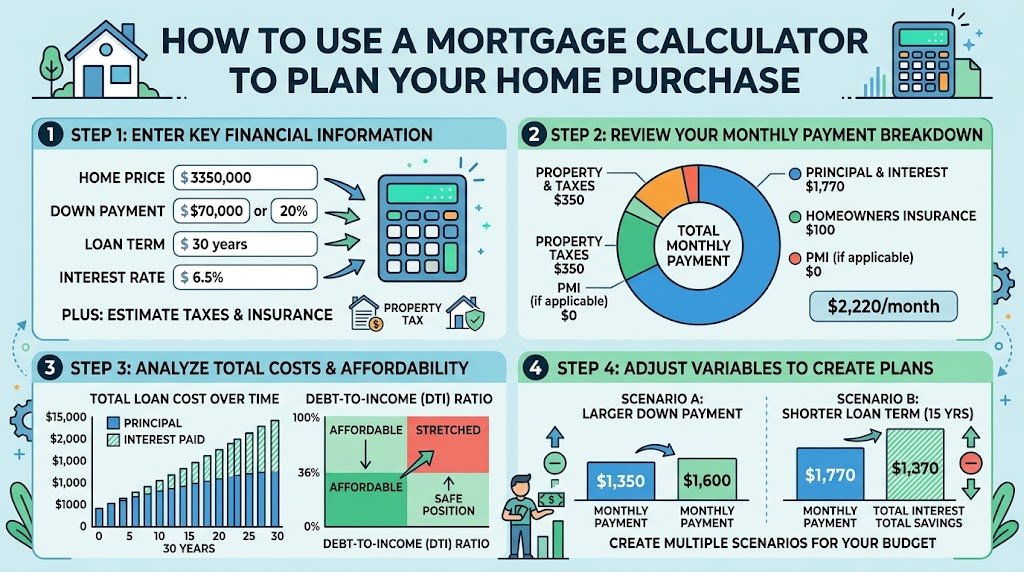
Most people start house hunting the wrong way. They scroll listings, fall for a kitchen, and only then ask whether they can afford it. By that point, the number on the screen has already set their expectations, and the budget has to bend to fit.
A better order is to run the numbers first. A good mortgage calculator takes about two minutes and tells you what a home will really cost each month. That makes every listing you look at afterward a lot easier to judge.
Here’s how to use one properly, what to enter, and how to read the results without fooling yourself.
Affordability vs. Payment: Two Different Questions
Before you open any tool, it helps to know which question you’re asking.
A mortgage affordability calculator works backward from your finances. You enter your income, monthly debts, and down payment, and it estimates the highest home price you could reasonably take on. Our house affordability calculator is built for this.
A mortgage payment estimator works forward from a specific home. You enter the price, down payment, interest rate, and loan term, and it tells you the monthly payment. This is what you use once you have a real property, or a realistic price range, in mind.
You’ll want both. Use the affordability side to set your ceiling, then the payment side to test individual homes against it.
What You Need to Enter (and Why Each One Matters)
Home price
Start with the price you’re actually considering, not the asking price of your dream home. If you’re unsure, run three numbers: a low, a middle, and a stretch.
Down payment
This changes everything. A bigger down payment lowers your loan amount, your monthly payment, and often your rate. In the US, putting down less than 20% on a conventional loan usually means paying private mortgage insurance (PMI). If you’re still saving, a down payment calculator shows how long it’ll take to reach your target.
Interest rate
Use a rate you could realistically qualify for, not the lowest one you saw in an ad. Your credit score, loan type, and down payment all affect it. Also remember that the interest rate and the APR aren’t the same thing. The APR folds in lender fees, so it gives a truer picture of cost. You can compare offers with an APR calculator.
Loan term
The 30-year mortgage is the most common because it keeps payments lower. A 15-year loan costs more each month but saves a huge amount in interest. We’ll put real numbers on that below.
Property tax, insurance, PMI, and HOA fees
This is where most people get caught. The mortgage payment isn’t just principal and interest. Lenders look at PITI: principal, interest, taxes, and insurance. Add PMI and HOA dues if they apply. A calculator that ignores these will make a home look cheaper than it is.
A Real Example
Say you’re looking at a $400,000 home with 20% down ($80,000). That leaves a $320,000 loan at a 6.5% interest rate.
| 30-year loan | 15-year loan | |
|---|---|---|
| Principal & interest | ~$2,023/mo | ~$2,788/mo |
| Total interest paid | ~$408,000 | ~$182,000 |
Now add roughly $367 a month for property tax and $150 for homeowners insurance. The 30-year payment climbs to about $2,540 a month. That’s over $500 more than the “headline” payment, which is why skipping taxes and insurance is such a common mistake.
The 15-year option costs about $765 more per month. But it saves you around $226,000 in interest. Neither choice is automatically right. It depends on how much breathing room you need in your monthly budget.
To see exactly how each payment splits between principal and interest over time, use a mortgage amortization calculator. In the early years of a 30-year loan, most of your payment goes to interest. Seeing that laid out month by month tends to change how people think about extra payments.
How Much House Can You Actually Afford?
Lenders commonly use the 28/36 rule as a starting point:
- Your housing costs (PITI) shouldn’t exceed 28% of your gross monthly income.
- Your total debt payments, including the mortgage, car loans, student loans, and credit cards, shouldn’t exceed 36%.
Using the example above, a $2,540 housing payment would call for a gross income of roughly $9,070 a month, or about $109,000 a year, to stay within 28%.
Your total debt load matters just as much. A DTI ratio calculator shows where you stand before a lender ever looks at your file. If the number is high, paying down a car loan or a credit card first can do more for your approval odds than a bigger down payment.
One honest note: what a lender approves you for and what you can comfortably afford aren’t always the same. Approval limits don’t account for childcare, retirement savings, or the fact that you’d like to eat out sometimes. Run your take-home pay through a budget calculator and make sure the payment still feels livable.
Common Mistakes to Avoid
Forgetting closing costs. These typically run 2% to 5% of the loan amount and are due at signing. Many first-time buyers drain their savings on the down payment and then get surprised at closing.
Using a teaser rate. If your estimate uses a rate you won’t qualify for, every number afterward is wrong.
Ignoring maintenance. Owning a home means paying for repairs. A common rule of thumb is to set aside about 1% of the home’s value each year.
Not comparing loan types. If you have a smaller down payment, check an FHA loan calculator. Eligible veterans and service members should also run the numbers through a VA mortgage calculator, since VA loans often require no down payment and no PMI.
What Makes the Best Mortgage Calculator?
There isn’t one perfect tool, but the best mortgage calculator for planning a home purchase should:
- Include taxes, insurance, PMI, and HOA fees, not just principal and interest
- Let you compare different loan terms side by side
- Show a full amortization schedule
- Let you test extra monthly payments
- Be free and quick to use without signing up
Location matters too. Mortgage rules differ by country, so buyers in Canada should use a Canadian mortgage calculator, which accounts for semi-annual compounding and different payment frequencies.
Should You Even Buy Right Now?
Sometimes the calculator’s real answer is “not yet.” If the payment would stretch you thin, compare it against your current rent using a rent vs. buy calculator. Renting for another year while you save a larger down payment can leave you in a much stronger position.
The Bottom Line
A mortgage calculator won’t pick your house for you, but it will keep you from picking the wrong one. Set your price ceiling with an affordability check, test each home with a payment estimate that includes all your costs, and leave yourself some margin. If you go in with real numbers, you’ll negotiate with more confidence and spend less time worrying about the mortgage after you move in.
Ready to start? Run your numbers with our free mortgage calculator, or browse all our financial calculators.
FAQs
What is a mortgage affordability calculator?
It estimates the maximum home price you can afford based on your income, existing debts, down payment, and expected interest rate.
How accurate is a mortgage payment estimator?
It’s very accurate for principal and interest. The total payment is only as accurate as the tax, insurance, and PMI figures you enter, so use local estimates where possible.
Should I choose a 15-year or 30-year mortgage?
A 30-year loan gives you lower monthly payments. A 15-year loan costs more per month but saves a large amount of interest. Pick the one that fits your monthly budget comfortably.
Does a mortgage calculator include closing costs?
Most don’t. Budget for closing costs separately, typically 2% to 5% of the loan amount.